> ## Documentation Index
> Fetch the complete documentation index at: https://redo-44af351d-docs-return-item-identifiers-endpoint.mintlify.site/llms.txt
> Use this file to discover all available pages before exploring further.
# Shopify Hydrogen
> Integrate Redo returns coverage into your Shopify Hydrogen storefront
## Redo Free Returns Coverage
Redo offers a state of the art return management software which integrates seamlessly into Shopify and Hydrogen stores. It provides a customer portal to submit returns and a merchant app to monitor and manage returns. In the event of a return, Redo provides free return labels and package protection for an optional add-on fee which users add at checkout time.
NPM package for Shopify Hydrogen integration
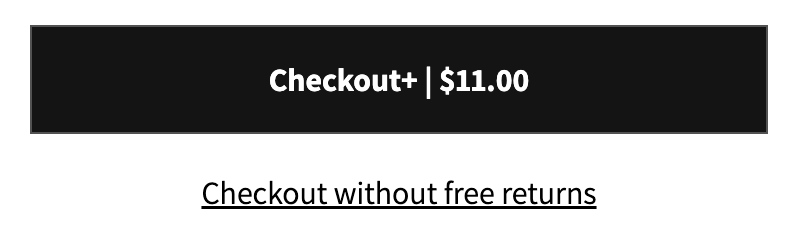 It's important that users provide explicit consent to have an add-on product
in order to be compliant with Shopify's rules regarding add-on products. To
achieve this, users should be given both options as checkout buttons and that
they select one. Users provide explicit consent for the add-on by clicking
the "Checkout+" option or by clicking "Checkout without free returns". Just
having a toggle that they can optionally change is not enough.
## Quickstart
For Redo Hydrogen stores, we provide the @redotech/redo-hydrogen npm package which provides wrapper utilities around our public API.
### Option 1: Use checkout buttons component
Add the RedoProvider:
```javascript theme={null}
// root.jsx or cart.jsx
import { RedoProvider } from "@redotech/redo-hydrogen";
// ...
export function ExampleCartMain = ({ originalCart }) => {
const optimisticCart = useOptimisticCart(originalCart);
return (
It's important that users provide explicit consent to have an add-on product
in order to be compliant with Shopify's rules regarding add-on products. To
achieve this, users should be given both options as checkout buttons and that
they select one. Users provide explicit consent for the add-on by clicking
the "Checkout+" option or by clicking "Checkout without free returns". Just
having a toggle that they can optionally change is not enough.
## Quickstart
For Redo Hydrogen stores, we provide the @redotech/redo-hydrogen npm package which provides wrapper utilities around our public API.
### Option 1: Use checkout buttons component
Add the RedoProvider:
```javascript theme={null}
// root.jsx or cart.jsx
import { RedoProvider } from "@redotech/redo-hydrogen";
// ...
export function ExampleCartMain = ({ originalCart }) => {
const optimisticCart = useOptimisticCart(originalCart);
return (
);
};
// ExampleCartDetail.jsx
import { RedoCheckoutButtons } from "@redotech/redo-hydrogen/src";
// ...
const ExampleCartDetail = ({ cart }) => {
const optimisticCart = useOptimisticCart(originalCart);
return (
{/* ... */}
{/* Content inside of checkout buttons will be shown if Redo is deactivated from the store or during initial setup */}
Checkout
);
}
```
### Option 2: Manual enable/disable with useRedoCoverageClient()
For more custom options, you use the useRedoCoverageClient() hook. **It's important that you await after calling redo.enable()**.
```javascript theme={null}
// root.jsx or cart.jsx (identical setup)
import { RedoProvider } from "@redotech/redo-hydrogen";
// ...
export function ExampleCartMain = ({ originalCart }) => {
const optimisticCart = useOptimisticCart(originalCart);
return (
);
};
// ExampleCartDetail.jsx (using instead of pre-built
import { useRedoCoverageClient } from "@redotech/redo-hydrogen";
// ...
const CartDetail = ({ cart }) => {
const redo = useRedoCoverageClient();
return (
{/* ... */}
await redo.enable()}>Checkout+ | {formatMoney(cart.cost.totalAmount + redo.price}
await redo.disable()}>Checkout without free returns
);
}
```
## Redo Info Card
This component is provided as an optional addition to your checkout design. It has an assorted number of customizations that are detailed below.
```javascript theme={null}
import { RedoCheckoutButtons, RedoInfoCard } from "@redotech/redo-hydrogen";
// ...
const ExampleCartDetail = ({ cart }) => {
const optimisticCart = useOptimisticCart(originalCart);
return (
{/* ... */}
{/* Similar to the RedoCheckoutButtons, if Redo is deactivated, this card will not appear*/}
{/*...RedoCheckoutButtons...*/}
);
}
```
Without any props passed, the info card will appear as shown below.
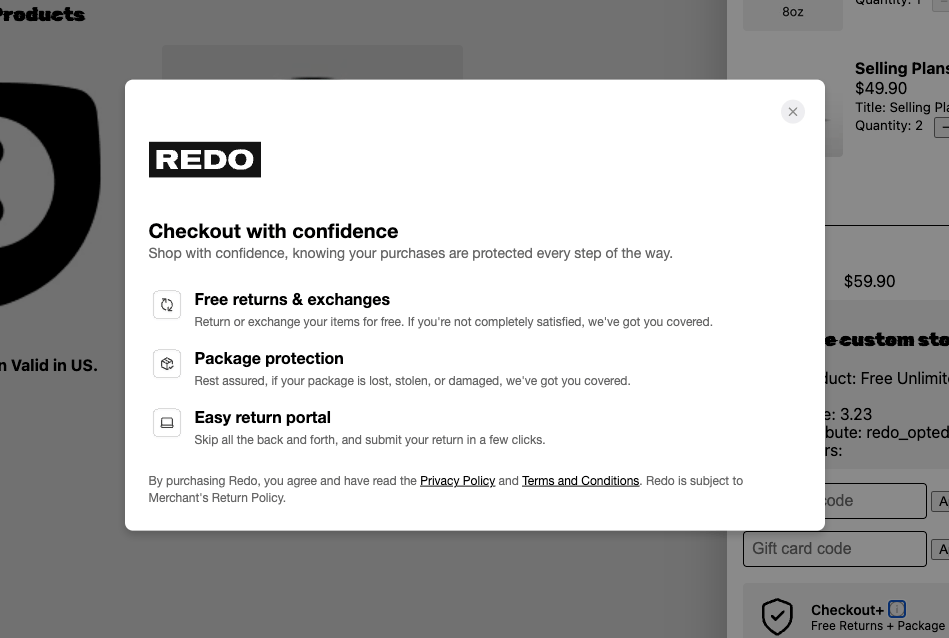
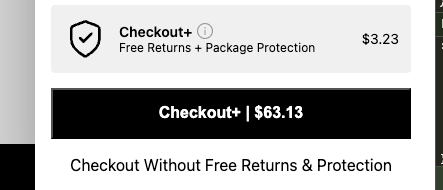 The info icon is the small icon to the right of "Checkout+" in the infoCard. That icon is clickable, and will open the modal shown below.
 ### Customizations
`showInfoIcon?: boolean = true`
This toggle decides whether the info icon is visible. Without the icon visible, there is no way to show the info modal.
`onInfoClick?: (): void`
This function allows for full customization of the infoModal. By passing in the click functionality, clicking the info icon will instead run this function.
`infoCardImageUrl?: string`
This url will replace the shield icon currently shown on the info card.
`infoModalLogoUrl?: string`
This url will replace the Redo logo currently shown on the info modal.
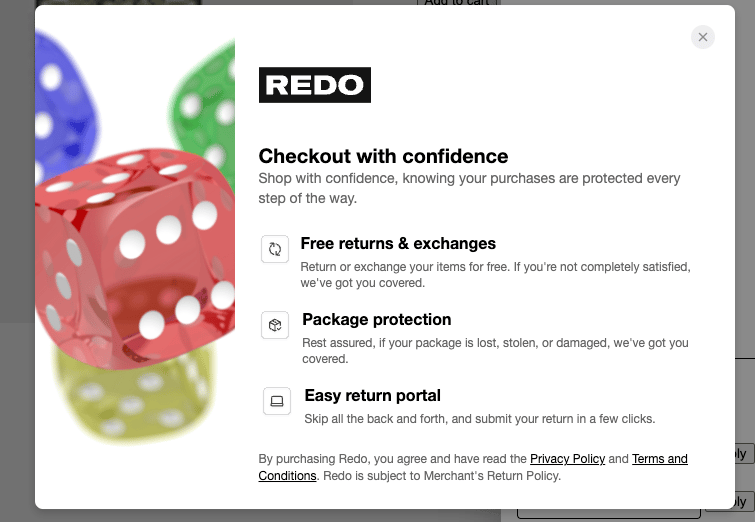
`infoModalImageUrl?: string`
This url will add a background image on the left side of the info modal. An example is shown below.
### Customizations
`showInfoIcon?: boolean = true`
This toggle decides whether the info icon is visible. Without the icon visible, there is no way to show the info modal.
`onInfoClick?: (): void`
This function allows for full customization of the infoModal. By passing in the click functionality, clicking the info icon will instead run this function.
`infoCardImageUrl?: string`
This url will replace the shield icon currently shown on the info card.
`infoModalLogoUrl?: string`
This url will replace the Redo logo currently shown on the info modal.
`infoModalImageUrl?: string`
This url will add a background image on the left side of the info modal. An example is shown below.
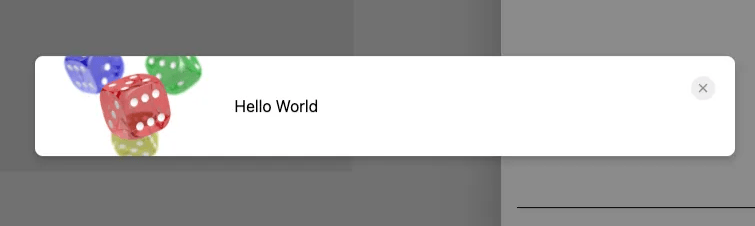
 `modalContent?: ReactNode`
This node will replace the internal content of the info modal with your own content. IMPORTANT: this will remove all styling of the main content, but it will not remove the infoModalImage. An example is shown below.
`modalContent?: ReactNode`
This node will replace the internal content of the info modal with your own content. IMPORTANT: this will remove all styling of the main content, but it will not remove the infoModalImage. An example is shown below.
 ## Utilities
The following utilities are provided as top-level exports from the @redotech/redo-hydrogen package.
The RedoCoverageClient provides functions to enable and disable coverage, as well as the information necessary to enable coverage manually without using the helper functions. It is a consumer of context from the RedoProvider so it must be a descendant.
### Functions
#### useRedoCoverageClient(): RedoCoverageClient
Returns a RedoCoverageClient object with the following interface:
```typescript theme={null}
interface RedoCoverageClient {
loading: boolean;
eligible: boolean;
disable(): Promise;
enable(): Promise;
enabled: boolean;
price?: number;
cartProduct?: CartProductVariantFragment;
cartAttribute?: CartAttributeKey;
errors?: RedoError[];
storeId?: string;
cart?: Cart;
}
```
* Price provided uses cart currency
* The cart and storeId values are just re-exporting the cart value passed into the provider
* If eligible is true, the price and cartProduct will for sure have a value and the price will be non-zero
### Providers
#### RedoProvider
```typescript theme={null}
RedoProvider(props: {
cart: Cart;
storeId: string;
children?: ReactNode;
}): JSXElement;
```
* Cart type should implement this [Cart type](https://shopify.dev/docs/api/storefront/2025-01/objects/Cart) from "@shopify/hydrogen". If you are getting errors, check the errors on the RedoCoverageClient. You should be getting a message saying what fields are missing.
* If you are using useCart(), this type varies slightly. As a workaround, use ``. Future versions of this package will be more flexible on cart input types.
### Components
#### RedoCheckoutButtons
```typescript theme={null}
RedoCheckoutButtons(props: {
onClick?: (enabled: boolean): void;
storeId: string;
cart: CartReturn;
}): JSXElement;
```
#### RedoInfoCard
```typescript theme={null}
RedoInfoCard(props: {
showInfoIcon?: boolean = true;
onInfoClick?: () => void;
infoCardImageUrl?: string;
infoModalLogoUrl?: string;
infoModalImageUrl?: string;
modalContent?: ReactNode;
}): JSXElement;
```
IMPORTANT: check the customizations section for information about each of
these props. onInfoClick and modalContent will drastically change the
behavior of this component.
## Content Security Policy
In order to allow the necessary requests to make it to Redo's API, you must put Redo's hostnames into your allowed hostnames list. The required domains have been exported from the module as the constant REDO\_REQUIRED\_HOSTNAMES:
```javascript theme={null}
import { REDO_REQUIRED_HOSTNAMES } from "@redotech/redo-hydrogen";
const { nonce, header, NonceProvider } = createContentSecurityPolicy({
shop: {
checkoutDomain: context.env.PUBLIC_CHECKOUT_DOMAIN,
storeDomain: context.env.PUBLIC_STORE_DOMAIN,
},
defaultSrc: [...REDO_REQUIRED_HOSTNAMES],
connectSrc: [...REDO_REQUIRED_HOSTNAMES],
});
```
## API
The utilities provided retrieve all of their information using the Redo public API endpoints described in our documentation at [https://developers.redo.com/](https://developers.redo.com/), specifically the [Get coverage product](https://developers.redo.com/docs/redo-api/beb7bc5b27a0c-get-coverage-products) endpoint.
## Speed Optimization
For stores that support multiple simultaneous cart actions (adding/removing cart lines and modifying cart attributes), you can improve speed further by adding the Redo product and cart attribute simultaneously. Instead of calling `redo.enable()` and `redo.disable()`, manually add the `redo.cartProduct` and `redo.cartAttribute` in a single request.
If manually adding the Redo product and attributes, it's important to clear
out any other Redo products as they may change based on cart contents. Redo
products can be identified by the vendor name "re:do".
The RedoCheckoutButtons will remove other Redo products upon page load, ensuring that Redo is only added at checkout time, even if someone has just navigated back from checkout. However, when rolling your own "Redo enable/disable" functionality, you will need to worry about implementing this yourself.
## Support
This package is being maintained and developed by the Redo team. For questions or implementation support, please contact [eng-hydrogen@getredo.com](mailto:eng-hydrogen@getredo.com).
## Utilities
The following utilities are provided as top-level exports from the @redotech/redo-hydrogen package.
The RedoCoverageClient provides functions to enable and disable coverage, as well as the information necessary to enable coverage manually without using the helper functions. It is a consumer of context from the RedoProvider so it must be a descendant.
### Functions
#### useRedoCoverageClient(): RedoCoverageClient
Returns a RedoCoverageClient object with the following interface:
```typescript theme={null}
interface RedoCoverageClient {
loading: boolean;
eligible: boolean;
disable(): Promise;
enable(): Promise;
enabled: boolean;
price?: number;
cartProduct?: CartProductVariantFragment;
cartAttribute?: CartAttributeKey;
errors?: RedoError[];
storeId?: string;
cart?: Cart;
}
```
* Price provided uses cart currency
* The cart and storeId values are just re-exporting the cart value passed into the provider
* If eligible is true, the price and cartProduct will for sure have a value and the price will be non-zero
### Providers
#### RedoProvider
```typescript theme={null}
RedoProvider(props: {
cart: Cart;
storeId: string;
children?: ReactNode;
}): JSXElement;
```
* Cart type should implement this [Cart type](https://shopify.dev/docs/api/storefront/2025-01/objects/Cart) from "@shopify/hydrogen". If you are getting errors, check the errors on the RedoCoverageClient. You should be getting a message saying what fields are missing.
* If you are using useCart(), this type varies slightly. As a workaround, use ``. Future versions of this package will be more flexible on cart input types.
### Components
#### RedoCheckoutButtons
```typescript theme={null}
RedoCheckoutButtons(props: {
onClick?: (enabled: boolean): void;
storeId: string;
cart: CartReturn;
}): JSXElement;
```
#### RedoInfoCard
```typescript theme={null}
RedoInfoCard(props: {
showInfoIcon?: boolean = true;
onInfoClick?: () => void;
infoCardImageUrl?: string;
infoModalLogoUrl?: string;
infoModalImageUrl?: string;
modalContent?: ReactNode;
}): JSXElement;
```
IMPORTANT: check the customizations section for information about each of
these props. onInfoClick and modalContent will drastically change the
behavior of this component.
## Content Security Policy
In order to allow the necessary requests to make it to Redo's API, you must put Redo's hostnames into your allowed hostnames list. The required domains have been exported from the module as the constant REDO\_REQUIRED\_HOSTNAMES:
```javascript theme={null}
import { REDO_REQUIRED_HOSTNAMES } from "@redotech/redo-hydrogen";
const { nonce, header, NonceProvider } = createContentSecurityPolicy({
shop: {
checkoutDomain: context.env.PUBLIC_CHECKOUT_DOMAIN,
storeDomain: context.env.PUBLIC_STORE_DOMAIN,
},
defaultSrc: [...REDO_REQUIRED_HOSTNAMES],
connectSrc: [...REDO_REQUIRED_HOSTNAMES],
});
```
## API
The utilities provided retrieve all of their information using the Redo public API endpoints described in our documentation at [https://developers.redo.com/](https://developers.redo.com/), specifically the [Get coverage product](https://developers.redo.com/docs/redo-api/beb7bc5b27a0c-get-coverage-products) endpoint.
## Speed Optimization
For stores that support multiple simultaneous cart actions (adding/removing cart lines and modifying cart attributes), you can improve speed further by adding the Redo product and cart attribute simultaneously. Instead of calling `redo.enable()` and `redo.disable()`, manually add the `redo.cartProduct` and `redo.cartAttribute` in a single request.
If manually adding the Redo product and attributes, it's important to clear
out any other Redo products as they may change based on cart contents. Redo
products can be identified by the vendor name "re:do".
The RedoCheckoutButtons will remove other Redo products upon page load, ensuring that Redo is only added at checkout time, even if someone has just navigated back from checkout. However, when rolling your own "Redo enable/disable" functionality, you will need to worry about implementing this yourself.
## Support
This package is being maintained and developed by the Redo team. For questions or implementation support, please contact [eng-hydrogen@getredo.com](mailto:eng-hydrogen@getredo.com).